|
Easy to Install,
Easy to Use
With RIPCenter, getting up to speed and producing professional color is as
simple as install, open file, and print. Yet despite its simplicity, RIPCenter
contains a bevy of production tools that outperform bundled RIPs and Windows
printer drivers.
Professional Color,
Every Time
Default color calibration and ICC profiles – optimized for a variety of ink
and media combinations – provide consistent, accurate color “out of the
box” for those who are just getting into large format printing.
Easy
to Use Interface
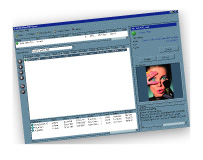
Simple and easy to navigate, the RIP-Queue interface lets you manage all
your printing from a single window.
Network-Accessible
Across Platforms
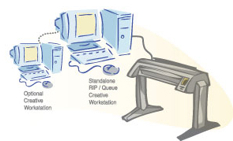
The RIPCenter queue appears as a normal printer on your network, so you
can print directly from your creative application from any Mac or PC on
the network, or drag and drop jobs into a Hot Folder.
Save
Media
A thumbnail preview gives you the ability to spot check your jobs before
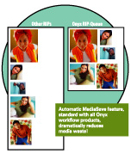
you print, reducing the need for reprinting. And, when you select Conserve
Media Placement, jobs are automatically arranged and positioned for
maximum media usage. A nesting preview provides visual assurance that you’re
getting the most out of your media.
Save Time and Money
RIPCenter brings greater speed, better performance and improved color
control to your printer. That translates into both time and money savings
that directly impact your bottom line.
|
Features and Benefits
-
Automatically installs the program, queue and printer in one easy
step
-
Print directly to the queue from your creative application as you
would to any desktop printer — even across networks and platforms
-
Visually preview files to avoid costly reprinting
-
Get automatic scaling and tiling of images
-
RIP and simultaneously print bitmapped files for faster throughput
-
Reduce ink consumption and media spoilage with MediaSave nesting
and nesting preview
-
Maintain your workflow while growing your business
Business/Office Graphics
-
Skip the service bureau & print your own display office graphics
-
Make large prints of Microsoft® PowerPoint® presentations
slides
-
Enjoy faster process and print times compared to slow printer hardware
RIPs
-
Get the right corporate colors when proofing advertising pieces
Photography/Fine Art
-
Print photographs and portrait packages directly from Adobe PhotoShop®
-
Get better color than from standard Windows® drivers
-
Dramatically reduce media costs by automatically nesting pictures
across media
-
Image interpolation for high-quality enlargements.
CAD & GIS
-
Enlarge computer-rendered TIFF images and print them as big as you
need
-
Save time - printing starts while image is still processing
-
Print directly from your Mac or PC CAD/GIS applications
-
Direct support for popular GIS formats like MrSID and ER Mapper
-
See Thumnail Preview before printing prevents bad prints from wasting
media
Upgrade Path
RIPCenter includes a PostScript RIP, a Raster RIP, and support for one
active printer with muliple Hot Folders. It also includes automatic tiling,
job thumbnail and print nesting previews. As you grow, add additional
printers and RIPs, pre-flight, color correction, media management and
profiling capabilities, and other productivity features as needed.
Suggested Minimum Requirements
Operating System:
- Windows 2000® Server w/ SP3
- Windows 2000-Pro® w/ latest service pack
- Windows XP Pro® w/ latest service pack
CPU:
- Intel Pentium III
- Athalon, 1.5 Ghz or higher
Storage:
- 40 Gb Hard Drive
- 1 Gb RAM per CPU
Video Display:
- 1280 X 768 16-bit color
One USB Port required for Security Key
DVD-ROM drive suggested, 40x CD-ROM Minimum Required |